
English
Quick commands
The quick command panel is on the right side of the output area and starts collapsed. Expand it with a click and drag to adjust the width. It is intended for sequences that need a request and a response, such as network setup, calibration or writing parameter blocks.
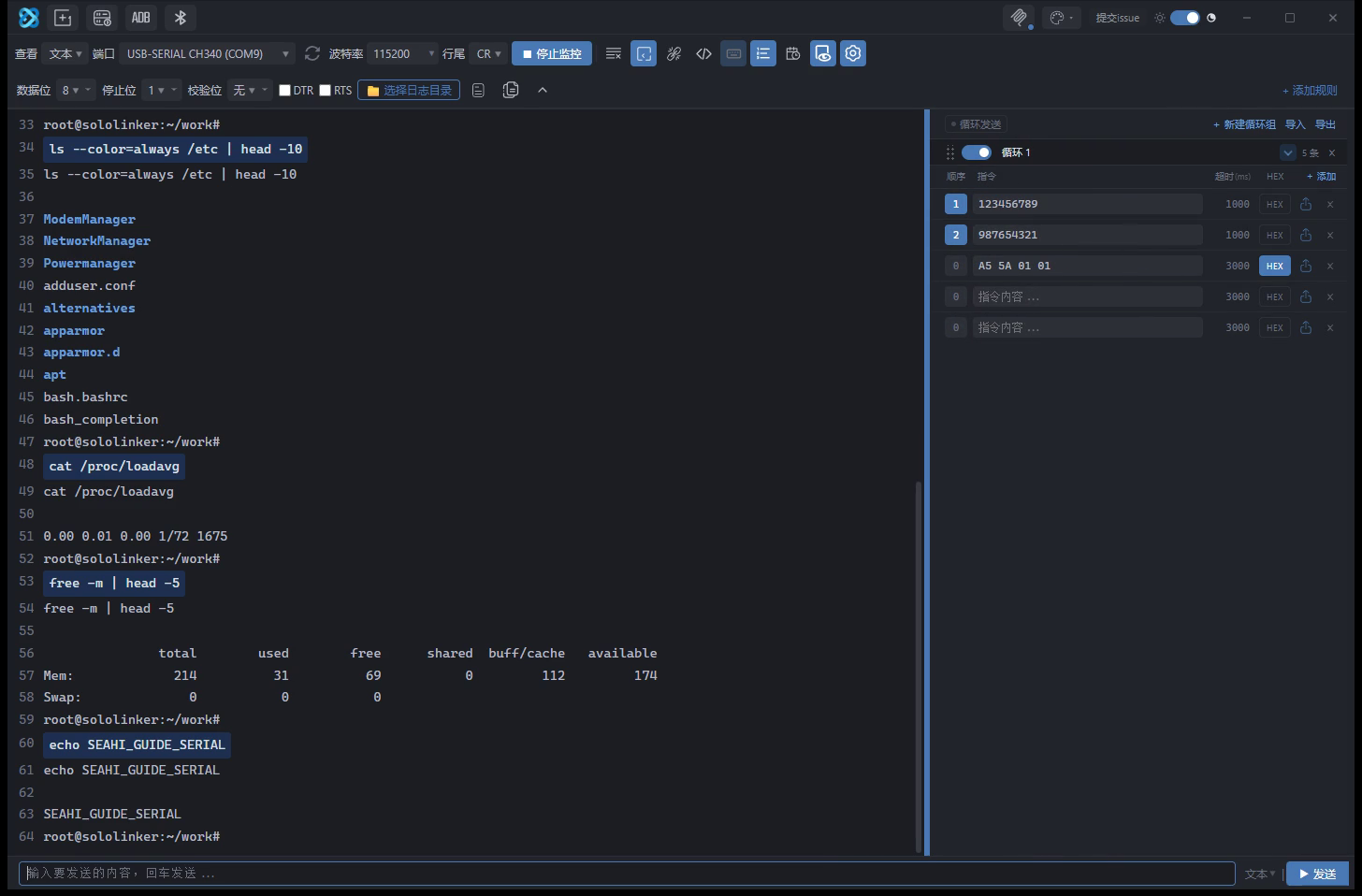
Groups
Commands are organised into loop groups. Each group has a title, a column header row and data rows.
- Click a group title to rename it. This also changes the
## Group nameline in the file. - Drag the group header to reorder groups. The topmost group is the starting point of the loop.
- The arrow collapses a group, leaving only its title.
- The switch on the group header skips the whole group without changing the sequence numbers. Turn it back on to restore it.
- + Add is at the right of each group. The app starts with one group; a new group contains one empty command.
Fields
| Field | Description |
|---|---|
| Sequence | 0 means the command is not part of the loop; values greater than 0 are sent in ascending order |
| Command | Text sent with a line ending; escapes such as \r\n are supported |
| Timeout (ms) | Wait time or sending interval for this command; defaults to 3000 |
| HEX | Send this command as hexadecimal bytes, independently of the main send bar |
| Send / Delete | Send this command once, or delete it |
Timeout
Timeout controls both waiting and pacing.
- With an Expected value set, it is the maximum time to wait for the device to reply.
- Without an Expected value, it is the interval before the next command. For example, 3000 sends one command every 3 seconds.
- A value of 0 uses the minimum interval of 20 ms.
Loop sending
The Loop sending switch at the left of the header starts and stops the loop.
| Response | Next step |
|---|---|
busy | Keep waiting |
OK | Follow the success jump, by default the next command |
ERROR | Resend this command, 3 times by default; after that follow the failure jump |
| Timeout | Treated as a failure and follows the failure jump |
Only rows with both a timeout greater than 0 and a non-empty Expected value wait for a response. Without a success keyword there is nothing to match, so the app only sends on the configured pace.
Groups run from top to bottom, and commands within a group run in ascending sequence order. After the last group the loop returns to the top.
Jumps are configured in the file. An empty success or failure jump means the next command; a number jumps to that sequence number; 结束 stops the loop. If the target does not exist, the app falls back to the next command and explains why. More than 200 consecutive jumps stops the loop automatically.
While the loop runs, nothing is written to the log window; only device output appears. The switch on the panel and the dot on the collapsed group indicate that the loop is running.
The loop stops automatically and shows a message when the connection drops, the pane closes or no commands remain. The switch state is not saved, so the app never starts sending commands on launch.
External files
Import attaches the command list to a Markdown file. Later edits in the panel are written back to that file.
#comments, the header row and extra columns are preserved.## Group nameseparates groups; a single#is still a comment.- Only the columns present in the header are read:
名称 | 指令 | 顺序号 | 超时(ms) | 期望 | 重试 | 成功跳转 | 失败跳转 | HEX. - Older files without these columns keep the previous behaviour: columns from the third onward are treated as notes and are never rewritten as sequence numbers.
- Writes use a temporary file and rename. The content hash is checked before writing, so a file changed by another editor produces a conflict instead of being overwritten.
- Export produces a self-contained copy with all columns filled in, so importing it on another machine keeps the loop configuration.
See QUICK_CMDS.md for column names, file headers, write rules and limits.